Monsters
The monster library holds every creature encounters can use, with its stats, attacks, abilities, defenses and loot.
- For the GM
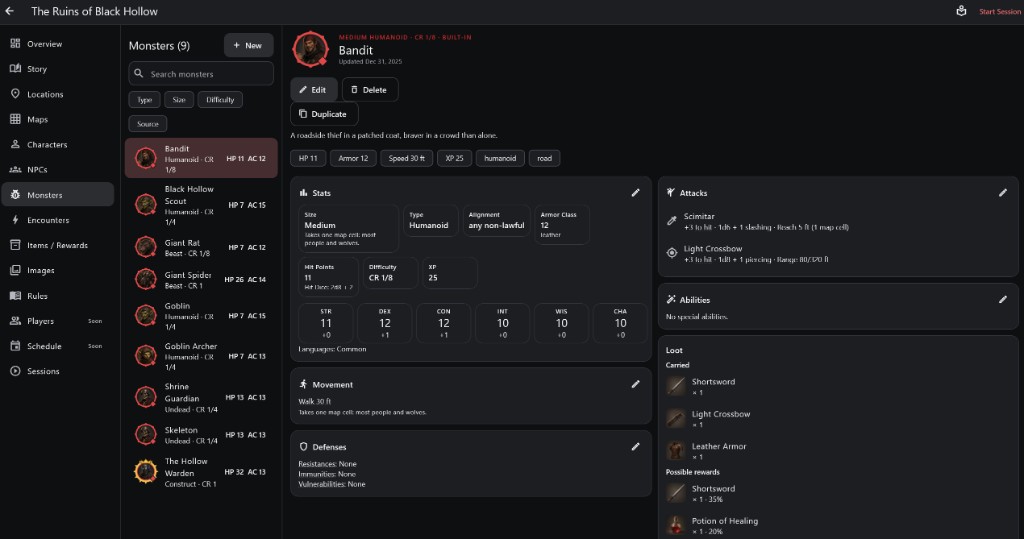
- 1Monster library Filter by type, size, difficulty or source.
- 2Portrait, CR and identity
- 3Stats Size, type, Armor Class, HP, difficulty, XP and ability scores.
- 4Attacks To hit, damage and reach or range.
- 5Movement and Defenses Speed, resistances, immunities and vulnerabilities.
- 6Loot What it carries, and possible rewards with their chance.
How to use it
- Open Monsters. Filter by Type, Size, Difficulty or Source.
- Edit changes a monster; Duplicate makes a copy to change, so the original stays as it was.
- The chips at the top summarise HP, Armor, Speed and XP.
Step by step
- Tap + New, or Duplicate a similar monster.
- Set Size, Type and stats; the editor fills in the derived numbers.
- Add attacks and abilities.
- Set defenses and loot.
Stats
- Size is how big it is. It also sets its footprint on the map: Medium takes one map cell, larger creatures take more.
- Type (Humanoid, Beast, Undead...) and Alignment describe it.
- Armor Class and Hit Points; the Hit Dice under HP show how its hit points are made.
- Difficulty is its Challenge Rating: a rough measure, not a guarantee. XP is what defeating it is worth.
Movement, Attacks, Abilities and Defenses
- Movement lists its speeds, such as Walk 30 ft.
- Attacks show the "to hit" bonus, damage and reach or range.
- Defenses list resistances, immunities and vulnerabilities. The app applies them to damage automatically.
Loot
- Carried items are what it has on it.
- Possible rewards each have a chance, such as 35%, so the loot differs from fight to fight.
Important rules
- Monsters are always controlled by the GM.
- CR is an estimate; numbers, tactics and luck matter too.
Common questions
Why is a big monster drawn over several squares?
Its size sets its footprint. Nothing else can stand in those squares.