Fog of War
Fog of War hides the parts of the map a character can't see. Players see what their characters see; the GM sees everything.
- For everyone
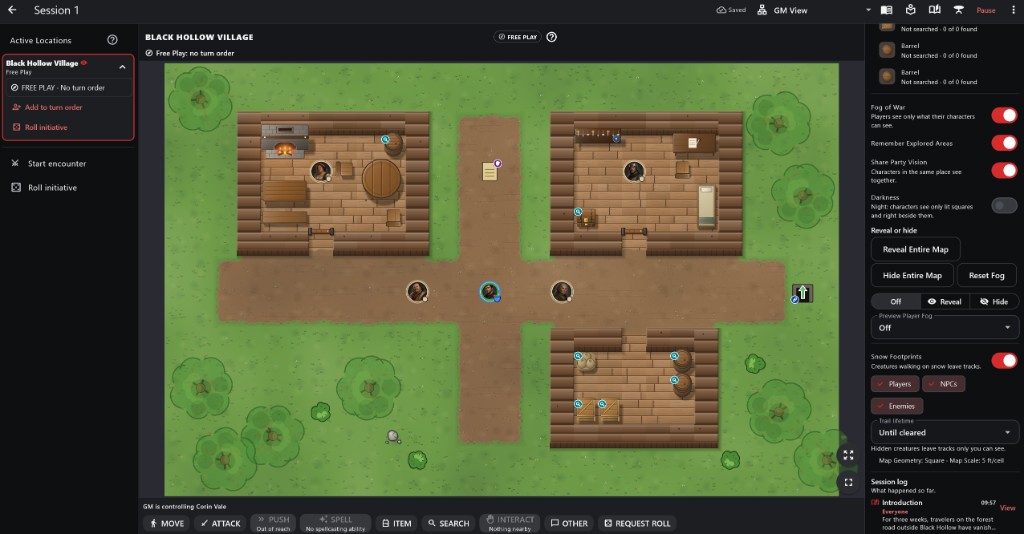
- 1Fog of War Fog, Remember Explored Areas, Share Party Vision and Darkness.
- 2Reveal or hide Reveal Entire Map, Hide Entire Map, Reset Fog, and a brush to reveal or hide by hand.
- 3Preview Player Fog See the map exactly as one player does.
- 4Snow Footprints Who leaves tracks, and for how long.
- 5Session log What happened so far, and who saw it.
How to use it
- Set the campaign's rule in Overview > Edit > Visibility. A map can follow it or turn fog on or off for itself.
- The fog panel in GM controls changes it for this session only.
Step by step
- Turn Fog of War on in the fog panel.
- Choose Remember Explored Areas, Share Party Vision and Darkness.
- Reveal or hide parts by hand if the story needs it.
- Use Preview Player Fog to check a character's view.
Fog of War for the GM For the GM
- Remember Explored Areas keeps rooms players have seen, dimmed. Share Party Vision lets characters in the same place see together. Darkness means only lit squares and those right beside a character are seen.
- Reveal Entire Map, Hide Entire Map and Reset Fog act on the map in view.
- To paint, choose Reveal or Hide, then Brush, Rectangle or Room, and tap the board. Set it back to Off to play normally.
- Your own board is never fogged. Preview Player Fog shows, see-through, what one character sees.
- Fog is saved with the session, never in the map, so a new session starts with fresh fog.
What You Can See For players
- You see only what your character can see, by the same line of sight as attacks. Walls, closed doors and big rocks block the view.
- Black squares you have never seen. Dimmed squares you saw before: you remember the room, not who is in it now.
- Creatures show only while you can see them; some stay hidden until the GM reveals them.
Important rules
- Fog hides squares; a hidden monster stays hidden even in a revealed square.
- Different locations never share vision.
Common questions
A player sees nothing at all.
Check Darkness, or use Reveal Entire Map.