Encounters
An encounter is a scene prepared before play: which monsters, where they stand, when more arrive and what it is worth. During a session the GM starts it.
- For the GM
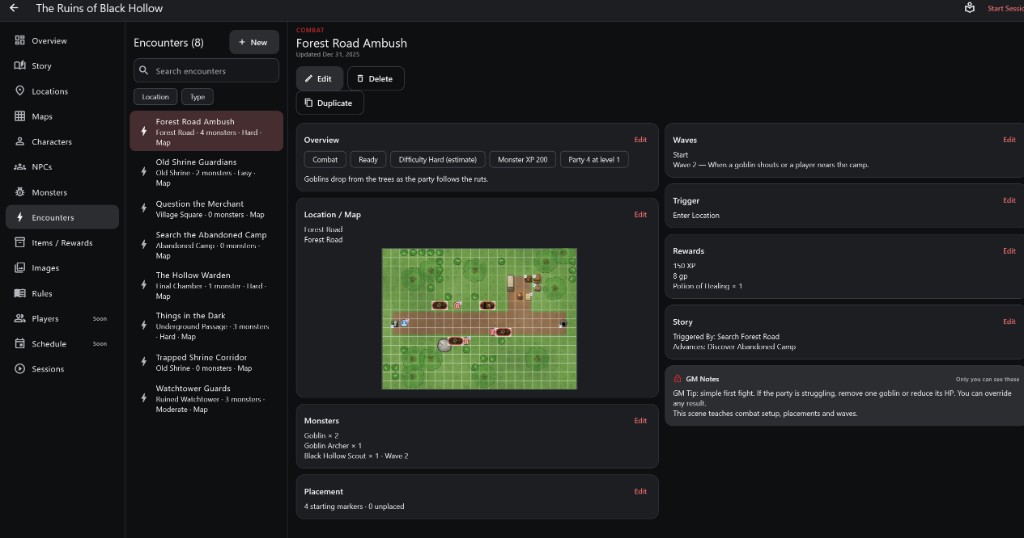
- 1Encounter list Location, monster count, difficulty and map.
- 2Overview Type, readiness, difficulty estimate and party.
- 3Location and map
- 4Monsters Who fights, and in which wave.
- 5Placement Starting markers placed on the map.
- 1Waves When later monsters join the fight.
- 2Trigger What starts the encounter.
- 3Rewards XP, money and items for winning.
- 4Story The story step it comes from and leads to.
- 5GM Notes Tips only the GM sees.
How to use it
- Open Encounters, pick one or tap + New. Filter by Location or Type.
- Each card on the page has its own Edit.
- Overview shows its type, whether it is Ready, an estimated difficulty from the monsters' XP and the party's levels.
Step by step
- Choose a type: Combat, Social, Exploration, Trap, Mixed or Custom.
- Pick the location and map.
- Add monsters and how many.
- Place their starting markers on the map (Placement).
- Optionally split them into waves.
- Set the trigger, rewards and story links, and write GM Notes.
Parts of an Encounter
- Placement shows how many starting markers are placed and how many monsters still have no place.
- Waves hold monsters back until later, for example "When a goblin shouts".
- Trigger records how it is meant to start: Manual, Enter Location, Enter Map Area, Interact With Object, Story Node or Custom. It is a note for you; the encounter still starts when you choose Start encounter.
- Rewards list XP, money and items. Story shows which story step it is Triggered By and which it Advances.
Starting an Encounter in Play For the GM
- In the session choose Start encounter and pick it. Its monsters appear on their starting markers and initiative is rolled, which switches the location to combat.
- A monster whose square is taken waits off the map for you to place it.
- End combat returns the location to Free Play.
Important rules
- Encounters are prepared before play and started by the GM.
- Difficulty is an estimate, shown as such.
Common questions
Does an encounter start by itself when players enter?
No. The trigger is a reminder; you start it.