Skip to content ↩ Return to website
Available now on Google Play · Coming to Steam on October 30th

GAME MASTER

Build Maps. Run Campaigns. Play Together.

A tabletop RPG campaign, map and session app for building adventures, running live games and playing together on a local network or over the internet. The app does the rules math and the bookkeeping; players make the decisions and roll their own dice; the GM stays in control.

  • Windows
  • Android
  • Steam
  • Google Play
  • Local Network + Internet Multiplayer

Only the GM pays. Players join free. Player Edition: Free · Full Toolkit: $19.99 USD, one-time · Prison Escape adventure: $0.99 USD

Available now on Google Play. Coming to Steam on October 30th. More updates and adventures coming soon to Game Master.

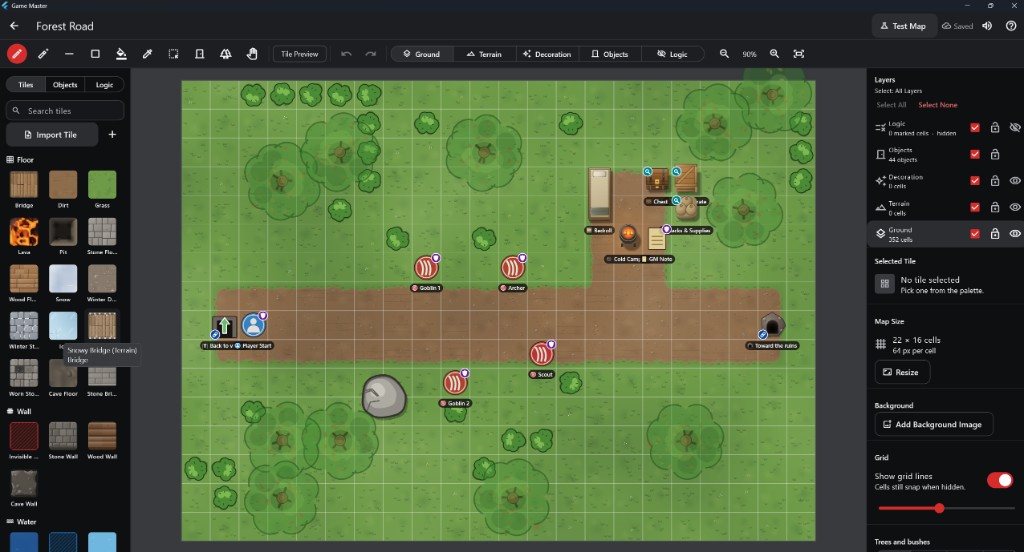
The Map Maker editing the Forest Road map: layer bar along the top, tile palette on the left, layers panel on the right, and the map with trees, a road, creature markers and a camp.
Map MakerGround, Terrain, Decoration, Objects and Logic layers, with Test Map in the top bar.
Editions & Pricing

Only the GM pays. Players join free.

Game Master is one app. Everyone starts with the free Player Edition. The GM who builds and runs the game unlocks the Full Toolkit inside the same app; there is no separate GM program to download.

Player Edition

Free

Everything a player needs to join a game and play.

  • Join games on your local network or over the internet
  • Play your character: move, act and roll your own dice
  • My Characters: make, keep and bring your own characters
  • Tabletop Mode for playing at a real table

Players never need the Full Toolkit to join a game.

Game Master: Full Toolkit

$19.99 USD one-time purchase

Everything in the Player Edition, plus the tools to build and run games.

  • Campaigns and Quick Start adventures
  • Map Maker
  • Content editors for characters, monsters, items, places and story
  • Encounters
  • Run sessions as the GM
  • Host games on your local network or over the internet

Unlocks inside the same app. No subscription.

Player Edition and Full Toolkit compared
FeaturePlayer Edition
Free
Full Toolkit
$19.99 USD, one-time
Join games (local network and internet)IncludedIncluded
Play your character and roll your own diceIncludedIncluded
My CharactersIncludedIncluded
Tabletop ModeIncludedIncluded
Campaigns and Quick Start adventuresNot includedIncluded
Map MakerNot includedIncluded
Content editorsNot includedIncluded
EncountersNot includedIncluded
Run sessions as the GMNot includedIncluded
Host games (local network and internet)Not includedIncluded
Adventure DLC · Prison Escape

$0.99 USD one-time purchase

Escape from Greystone Keep

A three-part level 1 adventure for 2–4 players. Goblins bought the party and plan to eat them: break out of the cells, recover your gear, free a thief named Snails, slip or fight through the fortress, and face the Buyer outside the walls. Every escape has stealth, trickery and combat options.

For the GM: running it needs the Full Toolkit. Players who join need nothing.

Where to get it

Google Play now · Coming to Steam on October 30th

The Full Toolkit is $19.99 USD and the Prison Escape adventure $0.99 USD on both stores: as DLC on Steam (Windows) and as in-app purchases on Google Play (Android).

Good to know

Prices and purchases

  • Prices in other currencies are set by each store and vary by country.
  • Purchases are separate per store: buying on Steam does not unlock Google Play, or the other way around.
  • Google Play: available now. Coming to Steam on October 30th.
FAQ

Questions about editions

Do players need the Full Toolkit?

No. Players join and play with the free Player Edition. Only the GM who builds and runs the game needs the Full Toolkit.

Is it a subscription?

No. The Full Toolkit is a one-time purchase.

Do I need to download another app?

No. The Full Toolkit unlocks the GM features inside the Game Master app you already have.

Does one purchase unlock both Steam and Google Play?

No. Each store sells and unlocks its own copy, so a purchase on Steam does not unlock Google Play, or the other way around.

What is Prison Escape?

An optional $0.99 USD adventure DLC for the GM: "Escape from Greystone Keep". The GM needs the Full Toolkit to run it; players join free as always.

When does it release?

Game Master is available now on Google Play. Game Master is coming to Steam on October 30th.

Features

Everything for the table in one app

Map Maker

Layered grid maps

Ground, Terrain, Decoration, Objects and Logic layers. Walls, doors, furniture, traps, water, ice, weather and indoor areas that play the way they look. Test any map before a session.

Campaign Management

Your whole campaign

Story, locations, maps, characters, NPCs, monsters, encounters, items and rewards, all connected. Start blank or from the built-in adventure.

Live Sessions

Run the game

Free Play exploration, prepared encounters, initiative, combat, messages and the Session Log, from one screen. Pause and resume exactly where you left off.

Multiplayer

Play together, near or far

Host on Windows and let players join from their phones, tablets or PCs: on the same local network, or from anywhere with an eight-character Join Code. Reconnects after Wi-Fi or mobile data drops. No accounts.

Combat & Automation

The math is done for you

Modifiers, hit or miss, damage, resistances, healing, HP, initiative and conditions are worked out and applied. Players still roll their own dice.

Fog of War

Only what they can see

Each player sees what their character can see. Remembered areas, darkness and shared party vision; the GM reveals or hides areas, objects and creatures.

GM Controls

The GM has the final say

Control monsters and NPCs, run several locations at once, and override hits, damage, saves, HP and turn order after the fact. Every override is logged.

Player View

Built for phones

MOVE, ATTACK, SPELL, ITEM, SEARCH, INTERACT, TALK. First tap previews, second tap confirms. Portrait works; landscape is recommended.

How to Play

Help and Glossary built in

A searchable manual with annotated screenshots, Quick Starts for GMs and players, and a Glossary of tabletop terms in plain words.
How It Plays

The app does the bookkeeping. The players play the game.

Choose a weapon or spell, see valid targets with range and modifiers, pick a target and roll. Hit or miss is resolved, damage is rolled, resistances apply, HP updates and it is all logged. Players choose every move, target and action.

The GM builds or picks an adventure

Maps, monsters and encounters, or the built-in starter.

The GM starts a session

Shared on the local network automatically, or online with a Join Code.

Players join and pick characters

From the session list, by IP address, or with the Join Code.

Explore, fight and roll

The app does the math; the GM can override afterwards.

Digital Dice

Players tap ROLL

When a player's character needs a roll, the app shows the exact dice and modifier, waits for the player's ROLL, animates the dice and resolves the result at once. GM-controlled creatures may roll automatically.

Tabletop Mode

Real dice, real minis

For one physical table: each roll can be made in the app or with physical dice, and the GM enters what the die shows. The app adds the modifiers and works out the outcome. Miniature markers with health rings suit a projected map.

Screenshots

From the current Windows build

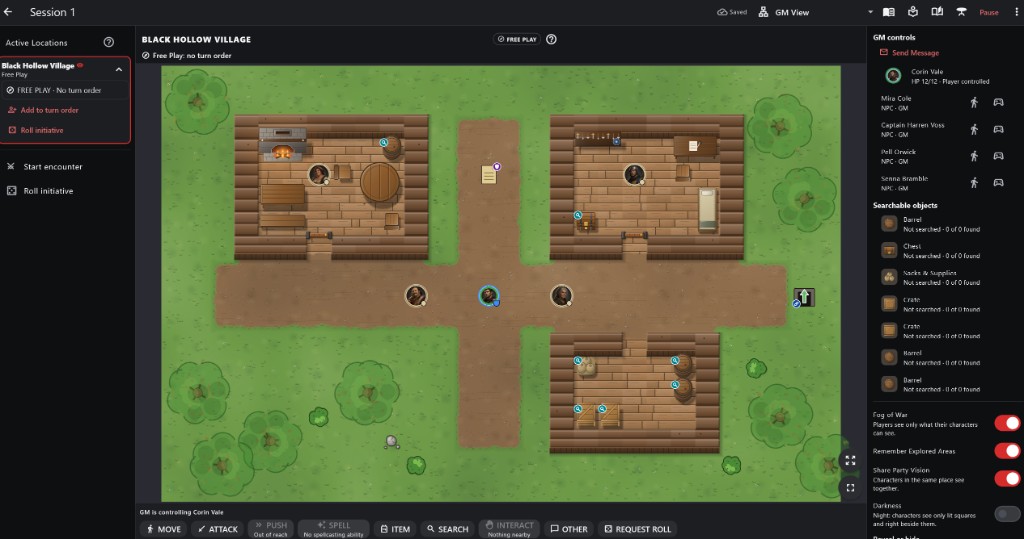
The GM's live session: active locations on the left, the village map with character and NPC tokens, GM controls and searchable objects on the right, and the action bar along the bottom.
GM SessionActive locations, NPC control, searchable objects and messages.
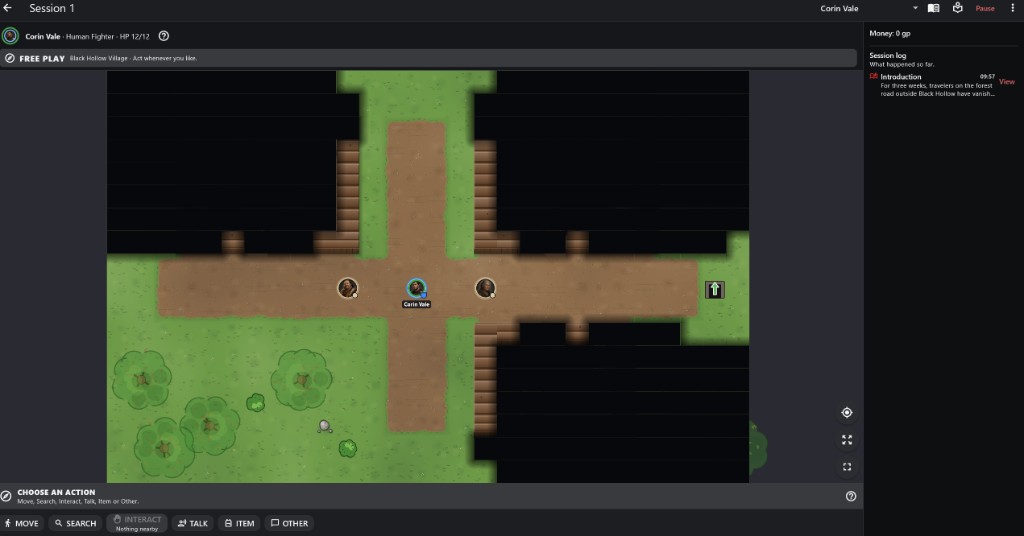
A player's view of the same session: fog of war hides unexplored areas, with the Session Log beside the map and action buttons below.
Player ViewFog of war shows only what the character can see.
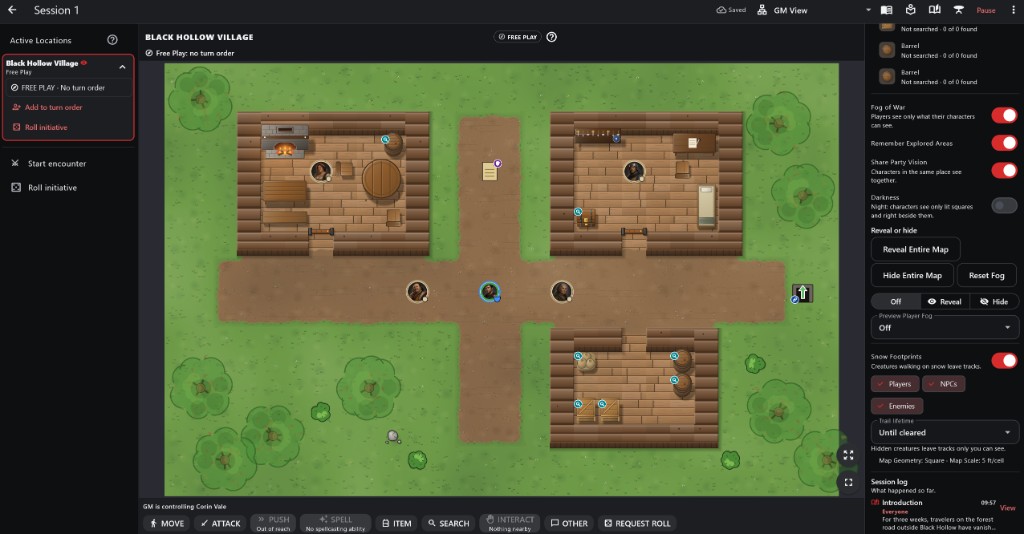
The GM session with fog of war, darkness, reveal and hide, and snow footprint controls in the right panel.
Fog & RevealFog of war, darkness, shared vision, reveal and hide tools.
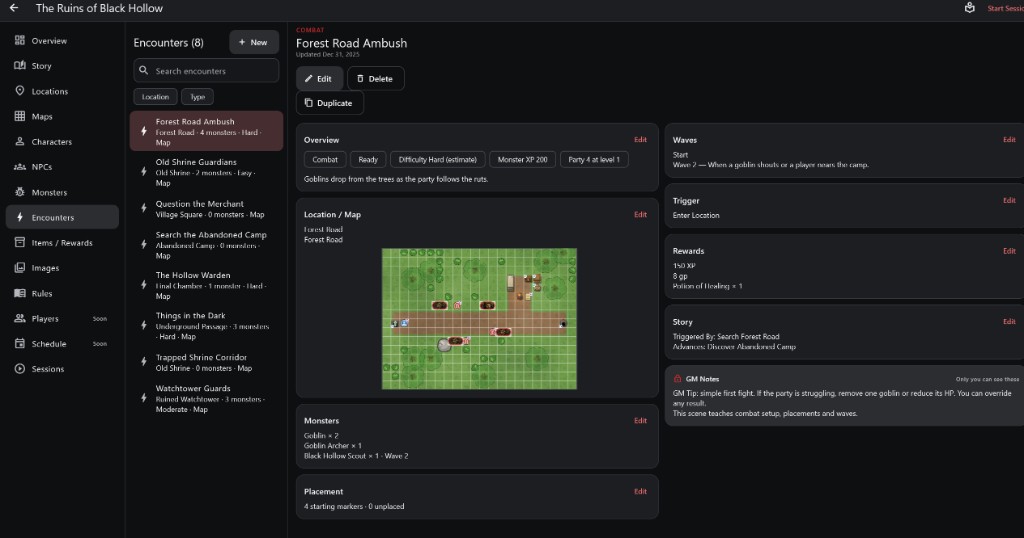
An encounter page with map placement, monsters, waves, trigger, rewards and GM notes.
EncountersPlacements, waves, triggers, rewards and GM-only notes.
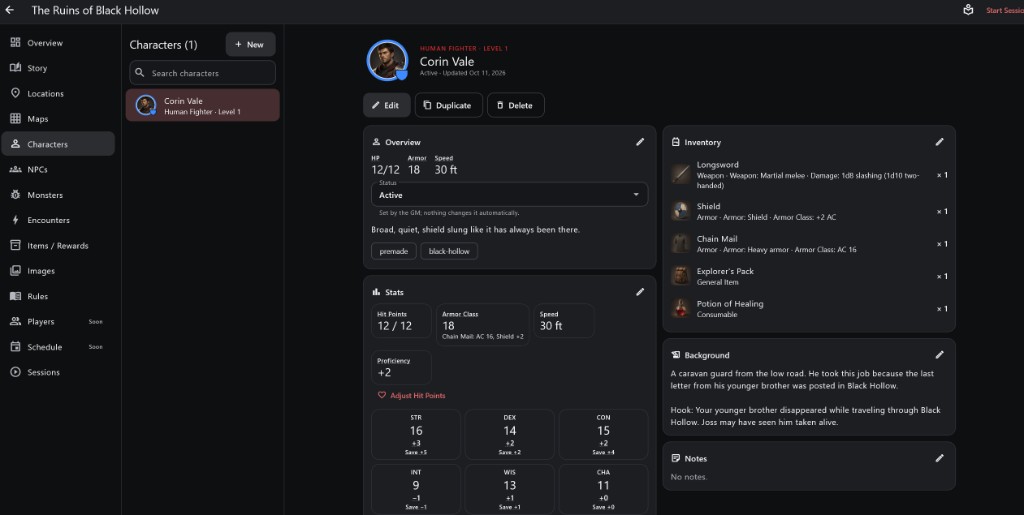
A character page with HP, armor class, ability scores and saves, inventory and background.
CharactersArmor Class, saves and bonuses calculated from the sheet.
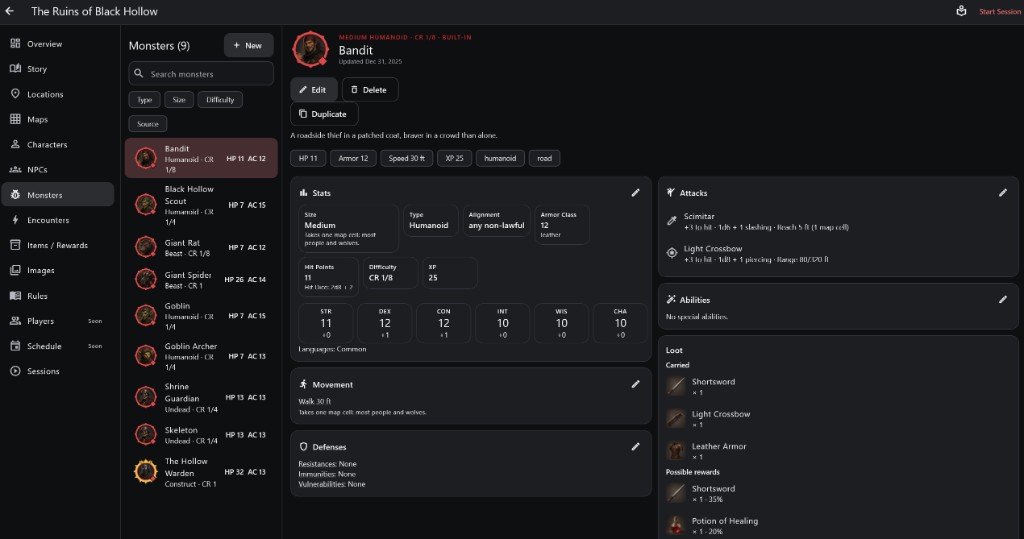
A monster page with stats, attacks, movement, defenses and loot.
MonstersStats, attacks, defenses and loot, with the math worked out.
Content

Build as much, or as little, as you want

Bestiary

  • 176 built-in creatures with original portraits
  • Browse by tier, role and category
  • Mimics disguised as objects
  • Custom monsters and variants

Items & Rewards

  • Weapons, armor, potions and gear with item art
  • Random loot and encounter rewards
  • Import your own portraits, tiles and sounds

Ready to Play

  • The Ruins of Black Hollow, a level 1 investigation
  • Sample maps: Forest Road, Tavern & Inn, Jail & Prison and more
  • Suggested builds and premade characters
Multiplayer

How multiplayer works

  • The GM's device hosts; it checks every move and saves the game
  • Each player's device receives only what their character may know
  • Progress stays in sync; short drops reconnect and catch up
  • Custom portraits, tiles and sounds are sent to players automatically
  • Local Network: join from the session list or by IP address, with an optional password. Everything stays on your network
  • Internet: players anywhere join with an eight-character Join Code. Games pass through Frozen Dungeon's relay, encrypted with TLS and never stored (see the Privacy Policy)
Online community

Find a campaign or a group

Public listings of campaigns looking for players, and groups you can join. This is separate from Join Game: a live session still uses an eight-character Join Code and does not need an account.

Joining a listing happens in the Game Master app with an optional account (Find Campaigns, Find Groups, My Groups, Join Campaign). Steam and Google Play copies do not include accounts yet. Maps, notes and saves stay on the GM’s device; this site never shows invite codes.

Roadmap

What’s Next for Game Master

Here’s our planned update order. There are no dates attached—we’ll release each stage when it’s ready.

Next Update — Custom Rulesets & Compatible Characters

Choose a rules preset, add house rules, or create your own tabletop system. The free character maker will support ruleset-specific sheets, and campaigns will check character compatibility. Existing AD&D characters and campaigns will remain supported.

Following Updates — More Fantasy & Modern Play Styles

We’ll expand the rules framework in this order:

  1. Tactical fantasy: action points, modifier stacking, and degrees of success—supporting play styles such as Pathfinder Second Edition.
  2. Percentile fantasy and horror: roll-under skills and custom resources, including sanity and fear.
  3. Supernatural and dice-pool games: count successes and distinguish special dice within a pool.
  4. Fast adventure systems: exploding dice, wounds, and resources spent on rerolls.
  5. Narrative systems: descriptive character traits, zones, stress, and consequences.

These stages target the kinds of mechanics found in games such as RuneQuest, Call of Cthulhu, Vampire, Savage Worlds, and Fate.

Then — Measured Movement

Ruler-style movement, facing, and formation tools for miniature games.

Then — Hex Maps

Hex-board creation, movement paths, range measurement, terrain costs, elevation, and six-direction facing.

Then — Sci-Fi & Large Battles

Expand into detailed walker combat, vehicles, squads, and army-scale play. Compatibility targets include the styles of BattleTech, Warhammer 40,000, Star Wars tabletop RPGs and miniature games, and other major systems.

The Goal

Bring your own game—or invent one—and play online with a human GM controlling the world, enemies, and NPCs. Game Master handles the shared tabletop, calculations, and bookkeeping.

Collectible card games are outside this roadmap.

Game names identify compatibility goals, not announced official partnerships. Named presets and bundled content will depend on applicable permissions and licensing.

Development Status

Available on Google Play

Game Master is available now on Google Play for Android. Game Master is coming to Steam on October 30th.

Working in current builds
  • Map Maker with layers, weather and Test Map
  • Campaign management
  • Live sessions with GM and player views
  • Automated combat, spells and checks
  • Local Network + Internet Multiplayer with reconnect
  • Tabletop Mode and phone layouts
  • How to Play and Glossary
Platforms

Windows · Steam

Coming to Steam on October 30th. Free Player Edition; the Full Toolkit (campaign building, Map Maker and hosting) and the Prison Escape adventure as Steam DLC.

Android · Google Play

Available now. Join sessions as a player for free, or unlock the Full Toolkit in the app to run the game from a tablet.