Items & Rewards
The item library holds one reusable definition of every item: weapons, armor, potions, gear. Characters, monsters, chests and rewards all point at these definitions.
- For the GM
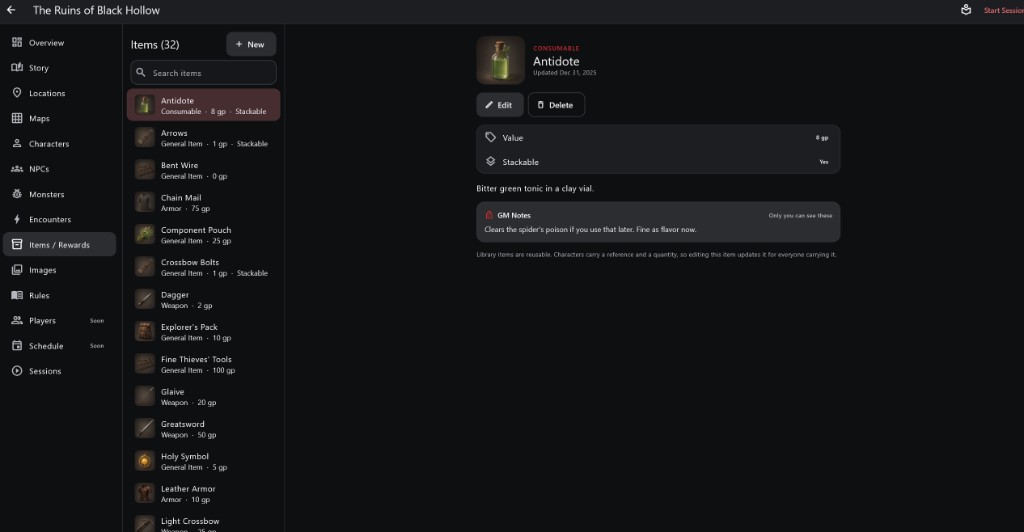
- 1Item library Type, value and whether each item stacks.
- 2Picture, type and name
- 3Value and Stackable
- 4GM Notes Only the GM sees these.
- 5Shared by everyone carrying it Editing a library item updates every character who has it.
How to use it
- Open Items / Rewards, pick an item or tap + New.
- Value is its price; Stackable means many fit in one inventory slot.
- GM Notes on an item are private.
Step by step
- Tap + New, name the item and choose its kind.
- Set its value and whether it stacks.
- Add it to characters, monster loot, searchable objects or encounter rewards.
Shared Definitions
- Characters carry a reference and a quantity, not a copy.
- So editing an item in the library changes it for everyone carrying it, at once.
- To make a different version, create a new item instead of editing the shared one.
Random Loot GM Details For the GM
- Searchable objects have Guaranteed results and optional Random Loot: a pool of items with chances, how many to pick and a money range.
- The roll happens the first time someone searches it successfully in a session and is saved, so reopening never rerolls.
- Generate Now, Reroll and Add Item are GM overrides and are logged. Keep quest items Guaranteed.
Important rules
- Editing a library item updates it for everyone carrying it.
- Sessions keep their own inventories, so play never changes your campaign's characters.
Common questions
I renamed a sword and every character's sword changed. Why?
They all carry the same library item. Duplicate it as a new item if only one should change.